Overview
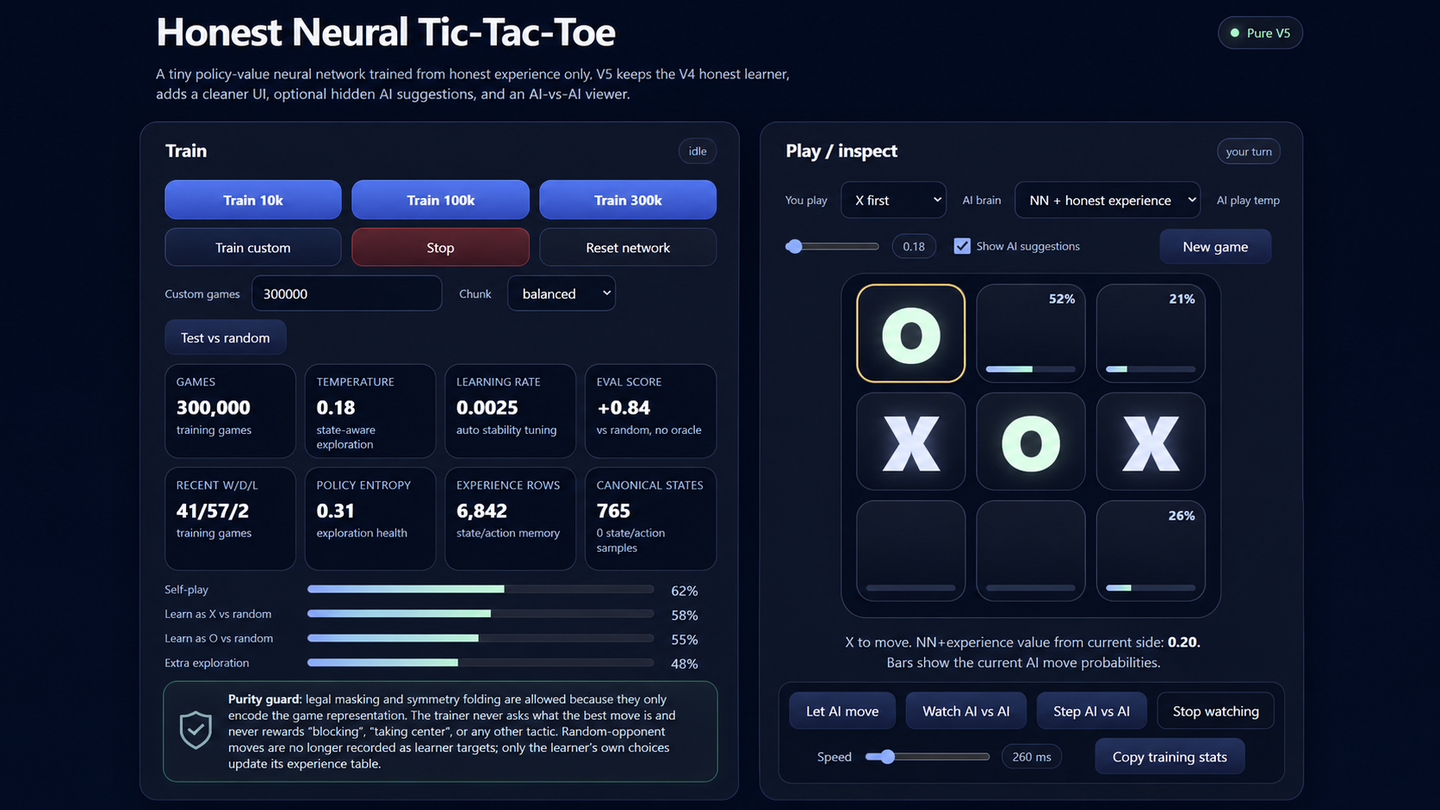
AI Tic Tac Toe is an interactive browser application built to make the behavior of a learning agent visible. Training, evaluation, AI-versus-AI observation and direct play are brought together in one interface.
The purpose was not simply to produce an unbeatable Tic Tac Toe opponent. A solved strategy could have been implemented much more directly. The technical goal was to build a learner that develops from its own played experience and lets users inspect that process.
The core concept
The project deliberately avoids minimax, a perfect-player oracle, labelled best moves and hand-authored tactical rules such as “take the center” or “block a fork.”
The learner is allowed to understand legal moves, terminal outcomes, board symmetry and the results of its own choices. This makes the quality of the training design important: useful behavior must emerge from experience rather than being inserted as hidden strategy.
How the system works
Training balances several forms of play. The learner plays as both the first and second player against a random opponent, participates in self-play and receives additional exploratory self-play.
Only decisions made by the learner are recorded as its experience. Random-opponent moves are not incorrectly attributed to the model.
Symmetrical board positions are folded together so that equivalent states do not need to be learned repeatedly. Exploration remains stronger for unfamiliar legal actions while repeatedly unsuccessful choices become less likely without being permanently prohibited.
Interaction and product design
Users can train the model, test its performance against random play, evaluate it separately as X and O, and play against the current learner.
Move probabilities can be shown when the user wants to inspect the model or hidden for a cleaner game. AI-versus-AI mode can run automatically or advance one move at a time, making it possible to observe the current policy without changing it through additional training.
The board, overlays and probability information are designed to remain visually stable rather than changing the geometry of the 3×3 grid.
Engineering decisions
The neural model, experience data, training loop, evaluation logic and interface all run locally in the browser. The project does not require a separate server or desktop installation.
Training and visualization must share the main browser environment without making the interface feel unresponsive. The implementation therefore treats model updates, evaluation and visible state as coordinated parts of one application rather than isolated demonstrations.
What the project demonstrates
The project demonstrates how an unfamiliar technical process can be made inspectable through product design.
Instead of presenting only a final score or claiming that the model “learned,” the interface exposes training controls, evaluation by playing position, move suggestions and automated observation. This makes the behavior easier to question, compare and understand.
Technical highlights
Honest learning constraints
No minimax, perfect-play oracle or labelled best-move dataset.
Balanced training
The learner trains as both X and O through several forms of generated play.
State symmetry
Equivalent board positions share learning rather than duplicating experience.
Visible policy
Move probabilities and automated play make the current behavior inspectable.
Client-side execution
Training, evaluation and interaction run directly in the browser.
Separated evaluation
Performance can be examined by playing position and model mode.