
System overview
The platform is a compact monolithic web application.
The browser requests a page or submits a form. PHP checks the session, applies permission rules, validates the request, reads or updates MySQL through prepared statements and returns the next server-rendered page. Vanilla JavaScript adds interaction where it materially improves the workflow.
This model avoids maintaining separate frontend and backend applications. It is well suited to a private organizational tool where dependable forms, clear navigation and straightforward deployment matter more than a large client-side application framework.
The main functional areas are:
- account access and recovery;
- repertoire and current-song organization;
- protected practice media and documents;
- internal notices;
- the member directory;
- the organization-wide message feed;
- member self-service;
- content administration;
- owner-level role management.
Those areas share one session and role model, one visual system and one underlying set of organizational data.
The access model
The application supports several levels of access because different workflows require different levels of identity and accountability.
A limited shared-access session provides low-friction entry to selected rehearsal material and internal notices. A verified named member account is required for member information, messages and personal settings. Administrators can maintain repertoire and bulletin content. The owner role controls higher-impact member and permission changes.
The important distinction is between authentication and authorization.
Authentication establishes who the user or session is. Authorization determines what that session may see or change.
The interface reflects those rules by omitting irrelevant controls, but visual hiding is not treated as the security boundary. Protected page handlers and state-changing actions also verify the required session role.
Higher-impact owner actions add another layer by requiring the current password again. This reduces the risk of a sensitive change being performed merely because an existing session is open.
The public explanation remains intentionally general. Exact operational access rules, identifiers and deployment configuration are private.
Server-rendered architecture
Each major destination is rendered on the server.
This provides several practical advantages for the project:
- navigation works through ordinary URLs;
- forms have a dependable server-side validation path;
- permission checks happen before protected content is rendered;
- pages do not depend on a large JavaScript runtime;
- the application fits ordinary PHP and MySQL hosting;
- page-specific JavaScript can remain focused and small.
PHP owns sessions, validation, authorization, database access and the final HTML response. MySQL stores the structured application data. PDO prepared statements keep submitted values separate from query instructions. PHPMailer handles verification and password-recovery mail.
JavaScript is used selectively for search, custom selection controls, message behaviour, upload workflows, drag-based organization and synchronized audio controls.
This division keeps essential behaviour available through the server while still providing richer interactions in the places where members or administrators benefit from them.
The repertoire model
The repertoire is represented as structured content rather than a loose directory of files.
A song has an identity, an optional group, a current or archive state and associated resources. Grouping reflects how the choir organizes its material, while the active-song state supports a second, more focused view for the pieces currently being rehearsed.
Documents and recordings remain associated with the song that gives them meaning. Members do not need to interpret storage folders or filenames to understand which resource belongs to which piece.
The separation between the complete archive and current material is a product decision as much as a data-model decision. It allows the same library to support long-term organization and immediate weekly use without forcing one interface to serve both purposes equally.
Practice media
Practice audio is organised around vocal use rather than around generic file uploads.
A song can contain full-ensemble material and separate recordings for the choir’s vocal sections. Alternate versions can provide different balances, such as a more isolated part or a supporting choir mix.
The song page converts that structure into a practical rehearsal interface. Members can choose the recording that matches their part, open related documents and adjust one playback-speed control for all audio on the page.
Audio delivery supports byte ranges. Instead of requiring the full file before seeking, the server can return the requested portion of the recording. This is especially useful for longer practice tracks and ordinary mobile connections.
The media system deliberately combines database metadata and stored files. The database defines which resources belong to a song and which category they represent. The file layer holds the audio and documents. Protected delivery checks the requested resource against that stored relationship before returning it through the intended application flow.
This is described at an architectural level only. Private storage locations, filenames and server rules are not part of the public case study.
Account lifecycle
Named accounts support the full member experience.
Registration is restricted to people with the organization’s access context and is completed through email verification. Passwords are stored through adaptive one-way hashing rather than as readable values.
Sign-in renews the session identifier. Password recovery uses expiring, single-use links and returns a neutral public response so the form does not reveal whether a submitted email address belongs to a member.
Once signed in, members can update their own account information and vocal-part assignment. Sensitive identity changes require additional confirmation. Account deletion coordinates related data and prevents the owner account from being removed through the ordinary self-service path.
The implementation separates this lifecycle from the limited shared-access workflow. Quick access is useful for selected content, but it is not treated as a substitute for a named identity when personal information or member actions are involved.
Internal communication
The message feature is intentionally lightweight.
It provides one chronological organization-wide feed for named members. Messages are associated with their sender, and a separate read record tracks whether each member has opened them. The main navigation can therefore show an unread count without changing the message itself.
Members see messages created after they joined the platform, keeping the feed aligned with their account history. Posting includes a small per-account burst limit to reduce accidental or repetitive submission.
The feature is not described as direct messaging, threaded conversation or a full collaboration suite. It has no private recipients, group channels, attachments or push notifications.
That limited scope is a product choice worth stating clearly: the platform supports short shared internal communication while avoiding the complexity of pretending to replace every communication tool.
Bulletins and current information
The bulletin area provides a protected place for internal notices and related documents.
Posts can be highlighted, archived and restored. The underlying model supports publication windows and optional event dates, while the current public description remains careful not to present the feature as a complete calendar.
For members, the important outcome is one reliable destination for current internal information. For administrators, the important capability is maintaining that information without editing a public website or distributing another attachment link.
Bulletin documents receive additional file checks before they are accepted. Content is rendered as text rather than trusted HTML, reducing the risk that an internal post becomes executable page markup.
The technical case study avoids publishing real notice content, schedules, authors or attachments. Demonstration visuals must use synthetic data.
Administrative workflows
Administrative interfaces translate complex data changes into task-focused workflows.
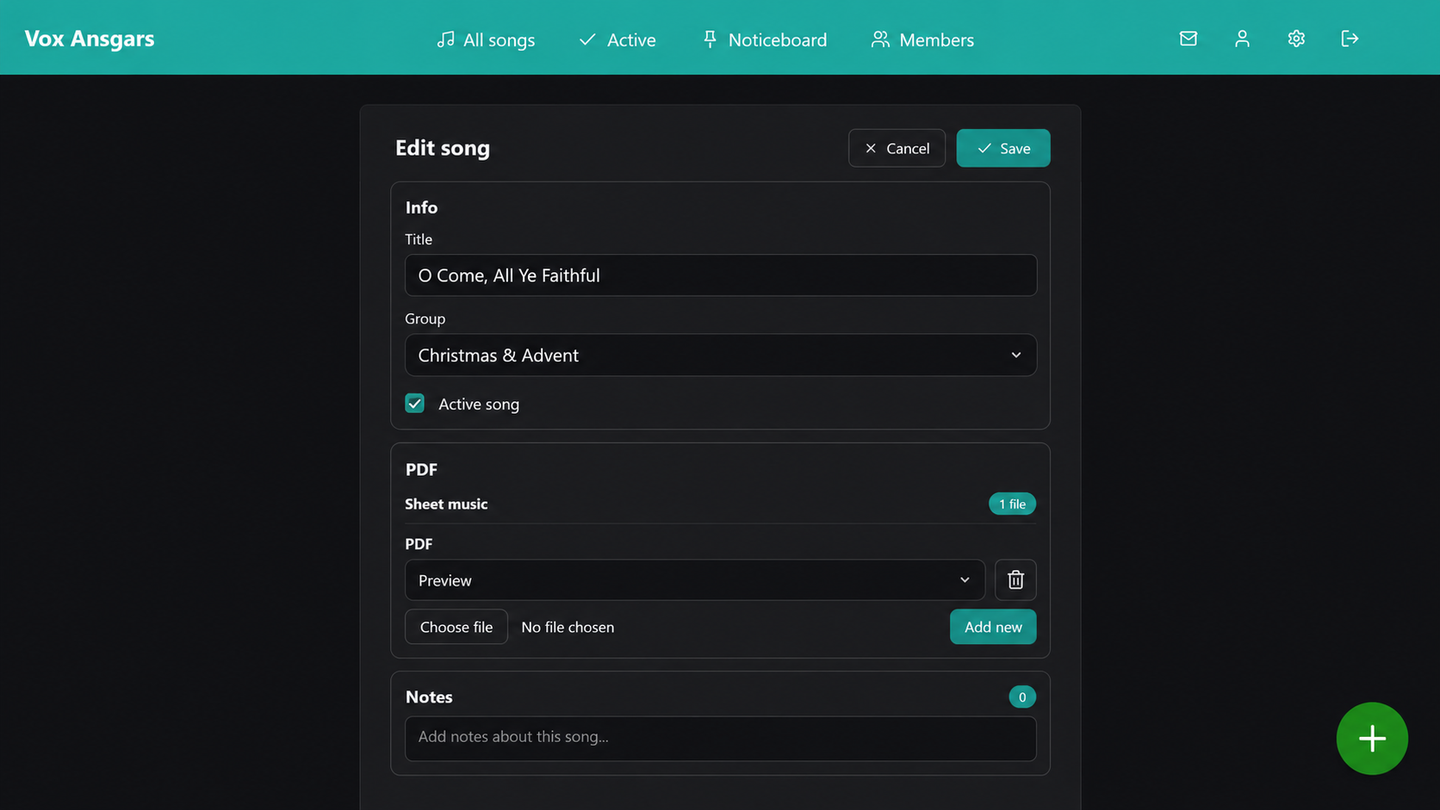
Song creation is staged so that administrators can establish the content, add documents, add recordings and assign organizational context without facing one oversized form. Existing songs can later be edited, reorganized or have individual files replaced.
Repertoire groups can be created and maintained. Songs can be assigned to the relevant group and marked as current when needed. Bulletin posts can be created, highlighted, archived and removed.
Owner-level tools are kept separate from ordinary content administration. Member search, role changes and ownership responsibilities are treated as higher-impact actions.
Server validation remains the final authority. Interface controls improve clarity, but state-changing handlers still verify role, request validity and target restrictions.
Transactions are used where several related database changes must succeed together, such as ownership or account operations. Confirmation and password reconfirmation provide additional protection around the most consequential changes.
Data and persistence
The platform combines structured relational data with private media files.
The relational model represents:
- member accounts and role flags;
- verification and recovery state;
- repertoire groups and songs;
- song documents and recording metadata;
- bulletin posts and attachments;
- messages and per-member read state.
Files remain outside the database, while database records describe what they belong to and how the application should present them.
This separation keeps large audio and document content out of ordinary relational queries while allowing permission and content logic to work with structured metadata.
Migration tools support the transition from older media layouts into a more consistent per-song organization. A dry-run approach makes it possible to inspect a planned migration before applying changes.
The public deep dive does not reproduce table names, paths, identifiers, private schema details or deployment configuration.
Responsive interaction
The platform is designed for repeated use on phones as well as desktop computers.
The main navigation remains sticky and can scroll horizontally instead of hiding destinations behind a large menu. On narrow screens, labels reduce while accessible names remain available.
The message view uses a dedicated full-height layout with a scrolling history and composer. Song and bulletin cards stack naturally. Forms expand to the available width, and administrative upload flows use sticky controls and safe-area spacing.
The implementation includes semantic labels, visible keyboard focus, a skip link, native form elements, keyboard-aware custom selectors and accessible value information for the playback control.
These details demonstrate accessibility-aware design, not formal accessibility conformance. The application has not been presented as independently audited, and some custom dialogs and controls still warrant dedicated screen-reader and keyboard testing.
Performance
The application’s performance strategy begins with architectural restraint.
There is no large frontend framework bundle. Each server-rendered route loads the shared visual system and only the small scripts relevant to that page.
Audio elements request metadata rather than downloading every recording immediately. Byte-range support allows seeking without transferring a complete file first.
Client-side search is appropriate for the current member and repertoire scale, and focused JavaScript updates avoid rebuilding an entire application state.
The architecture has not been presented with formal performance benchmarks. Several areas would need additional work before claiming support for much larger organizations or histories:
- long message feeds;
- very large member lists;
- growing repertoire archives;
- server-side pagination and search;
- monitored query performance;
- measured mobile and hosting performance.
The responsible claim is that the application is intentionally lean and media-aware, not that its scalability has been proven at arbitrary size.
Privacy boundaries
The technical case study is intentionally less detailed than the private implementation.
Safe public discussion includes the product structure, role hierarchy, account lifecycle, repertoire model, media streaming, administrative workflow and general defensive practices.
The following remain private:
- member identities and contact information;
- messages and internal notices;
- rehearsal dates and organizational routines;
- repertoire and uploaded content where permission is uncertain;
- private domains and URLs;
- filenames, storage paths and record identifiers;
- configuration, credentials, tokens and logs;
- precise deployment rules;
- security findings or reproduction details.
Any public screenshots must use a dedicated demonstration environment with fabricated names, messages, repertoire and files. Blurring production screenshots is not an acceptable substitute for safe source data.
Security is described as layered engineering work and continuing responsibility. The page must not claim certification, compliance, penetration testing or immunity from risk.
Testing and limitations
The supplied project evidence includes manual workflow checks and defensive implementation patterns, but not a broad automated test suite.
Important current safeguards include:
- server-side permission checks;
- request-forgery tokens on protected changes;
- prepared database statements;
- output escaping;
- password hashing;
- email verification and expiring recovery links;
- file-type validation;
- confirmation and password reconfirmation;
- transactional handling of selected multi-record changes.
Important areas for continued verification include:
- automated role and permission testing;
- account lifecycle integration tests;
- upload and protected-download tests;
- long-history and large-list performance;
- cross-device responsive testing;
- keyboard and screen-reader workflows;
- production monitoring and dependency review;
- deployment-specific security configuration.
The architecture is mature enough to support real internal workflows, but the public case study should distinguish implemented safeguards from independently verified guarantees.
Architecture overview
Member browser
      │
      ▼
Server-rendered PHP route
      │
      ├── Session and role checks
      ├── Request and file validation
      ├── CSRF and sensitive-action confirmation
      │
      ▼
PDO / MySQL structured data
      │
      ├── Accounts and roles
      ├── Repertoire and resource metadata
      ├── Bulletins and attachments
      └── Messages and read state
      │
      ▼
Private media storage
      │
      ├── Practice audio with range delivery
      └── Protected documents

Focused vanilla JavaScript enhances search,
upload workflows, messages and playback controls.
The architecture is intentionally compact.
Its complexity is concentrated in coordinating access, media, member information and administration rather than in maintaining a large distributed technology stack.
That makes the system understandable and deployable while still supporting the organization’s specific workflows.
A focused system, not a generic portal
The strongest engineering decision in the Choir Management Platform is that the application understands the work it supports.
Songs are not generic records. They have current status, organizational grouping, vocal-part recordings, alternate practice mixes and related documents.
Access is not one boolean login state. Limited shared entry, named membership, administration and ownership carry different responsibilities.
Internal information is not mixed into a public website. It is managed inside an environment designed for repeated private use.
The technology remains deliberately conventional. The differentiation comes from translating the choir’s operating model into a coherent, maintainable product.